

Chief of Staff
Agent. Preps meetings and captures follow-ups.
Meeting to follow-up is a recipe in Ai1, the AI agent platform by MyZone AI, where several agents and skills work together to deliver one outcome. The Chief of Staff preps the meeting and captures what was decided, each follow-up gets an owner, a next step and a date, and the Project Manager turns the ones you approve into tracked work in Ai1 Tasks.
How the recipe works
The Chief of Staff captures what was agreed, you approve it, and the Project Manager puts each follow-up into Ai1 Tasks.
Chief of StaffMeeting prep and follow-up Project ManagerTask routing in Ai1 Tasks
Prepared meetings
An agenda and talking points before each meeting, with past commitments in view.
Nothing slips
Each follow-up has an owner, a next step and a date.
No chasing by hand
Agents do the chasing in Ai1 Tasks, and you see what is moving and what is stuck.
At a glance
| Agents | Chief of Staff and Project Manager |
|---|---|
| Before | Agenda, context, questions to ask and the outcome to aim for |
| After | Decisions and follow-ups, each with an owner, next step and date |
| Where it lives | Ai1 Tasks |
| Sends | Nothing without your OK |
Most meetings end with action items that nobody tracks. A week later, nobody is sure who agreed to what. This recipe turns each commitment into an owner, a next step and a date while the meeting is still fresh, and keeps it on one list until it is done.
How this differs from the Chief of Staff on its own: the recipe adds the Project Manager, so approved follow-ups become tracked tasks rather than notes.
How it works
A simplified view. Anything that leaves the business waits for you.
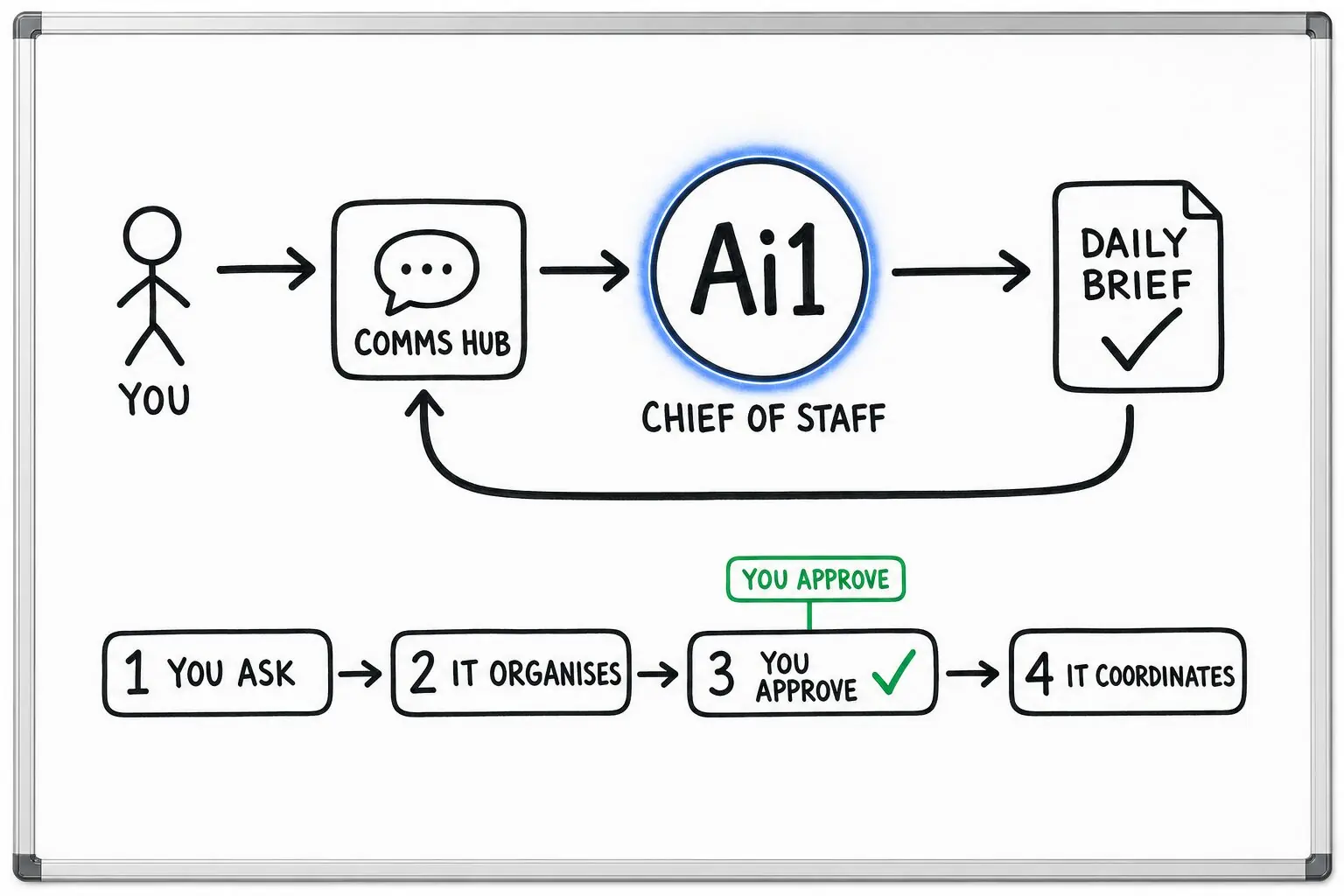
Pulls the context, past commitments, the questions to ask and the outcome to aim for.
After the meeting, it records the decisions and the follow-ups.
Turns each commitment into an owner, next step, date and status, with a recommended action.
You check the follow-ups. Anything that goes outside the business waits for your OK.
Turns the follow-ups you approved into tasks in Ai1 Tasks, so agents do the chasing.
What you get after a meeting
Example with a fictional business. Names and figures are invented to show the kind of list you get.
What it was asked: What did we agree in this morning's meeting, and who is doing what?
| Decision | Raise the Dunmore quote by 4%, starting next month. |
|---|---|
| Follow-up 1 | Send the new quote to Dunmore. Owner: Priya. Due: Thursday. Status: draft ready for your OK. |
| Follow-up 2 | Check fuel costs for the northern route. Owner: Tom. Due: next Monday. |
| Stuck | The warehouse lease question from two weeks ago still has no owner. |
| In Ai1 Tasks | Both follow-ups are tasks with an owner and a due date. |
Run it on a schedule
Set it up as a job and the follow-ups are captured after every meeting without anyone asking. You still approve the list before anything goes out.
| Starts | The end of each meeting |
|---|---|
| Schedule | After every meeting |
| Needs from you | Your calendar, and the notes from each meeting |
| You get | Decisions and follow-ups, each with an owner, a date and a reminder |
| If it can't finish | A passing problem, such as a brief outage, gets a limited number of retries. If the run still cannot finish, it goes to the job's owner instead of looping. |
Built-in guardrails
Here is how the recipe keeps you in control.
Better together
The agents, apps and jobs behind this recipe.
Agent. Preps meetings and captures follow-ups.
Agent. Turns approved follow-ups into tasks.
App. Keeps every follow-up on one list.
Job. Puts open follow-ups in your daily brief.
Common questions
It drafts them. Anything that goes outside the business waits for your OK.
No. Many clients never open it. They talk to the agent in chat or Slack, and the agent reads and updates the app for them.
An owner, the next step, a date or checkpoint, a status and a recommended action.
Yes. Set it up as a job and it captures the follow-ups after every meeting. You still approve the list.
We will run the recipe on one of your own meetings and walk you through the follow-up list.