

Google Ads Manager
Agent. Runs the clean-up as part of its weekly review.
The search term clean-up is a skill in Ai1, the AI agent platform by MyZone AI. The Google Ads Manager runs it on your account view-only: it reads what people actually searched before clicking your ads, groups the searches that brought no lead, and hands you the negative keywords to add. It changes nothing in your account.
Find the leak
See exactly which searches cost money and brought nothing back.
A list ready to paste
The negative keywords to add, grouped by theme so they are quick to check.
Budget back where it works
Money stops going to searches that never turn into customers.
At a glance
| Reads | Your Google Ads search terms report, matched to leads |
|---|---|
| Access | View-only. It never changes a campaign, budget, bid or keyword |
| Looks for | Searches that spent money without a call, form or quote |
| You get | The wasted searches grouped by theme, and the negative keywords to add |
| Run by | The Google Ads Manager, weekly or on request |
| Also used in | The weekly ads review recipe |
You choose keywords, but Google decides which searches match them. Over time your ads start showing for searches you never meant to pay for: parts, free guides, jobs, other kinds of business. Each click is small, so nobody notices until the month adds up. The clean-up finds them every week and lists the fix.
How this differs from a full account audit by the Google Ads Manager: the audit looks at the whole account; this skill looks only at the searches you paid for.
How it works
Four steps, all view-only. Your team adds the negative keywords.
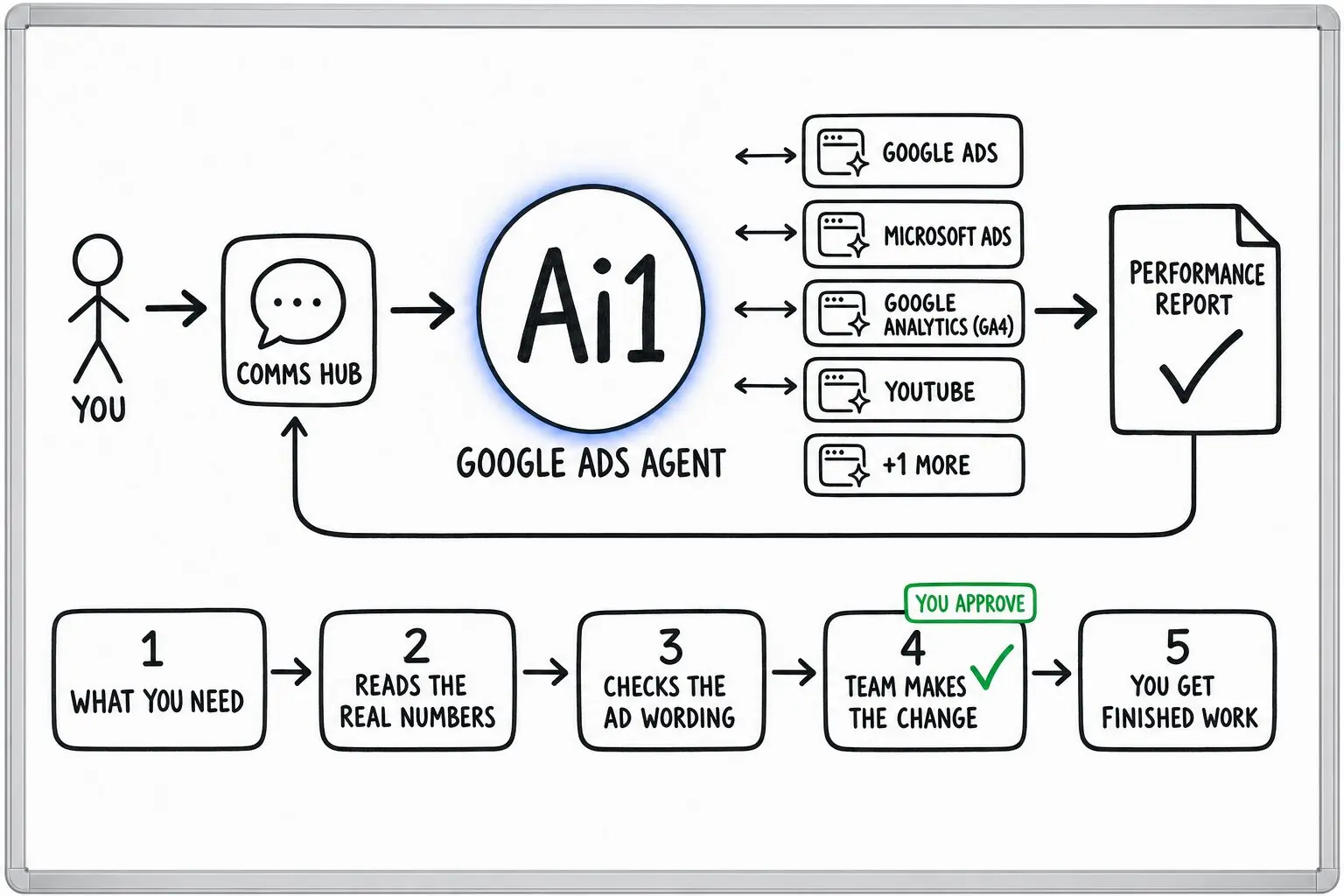
Pulls what people actually typed before clicking your ads.
Marks which searches brought a lead and which only cost money.
Groups the zero-lead searches by theme, so a pattern is easy to see.
You get the negative keyword list. A person on your team checks it and adds it.
Example search term review
Example with a fictional business. Names and figures are invented to show the kind of output you get.
What it was asked: Where is our Google Ads money going on searches that never turn into a call?
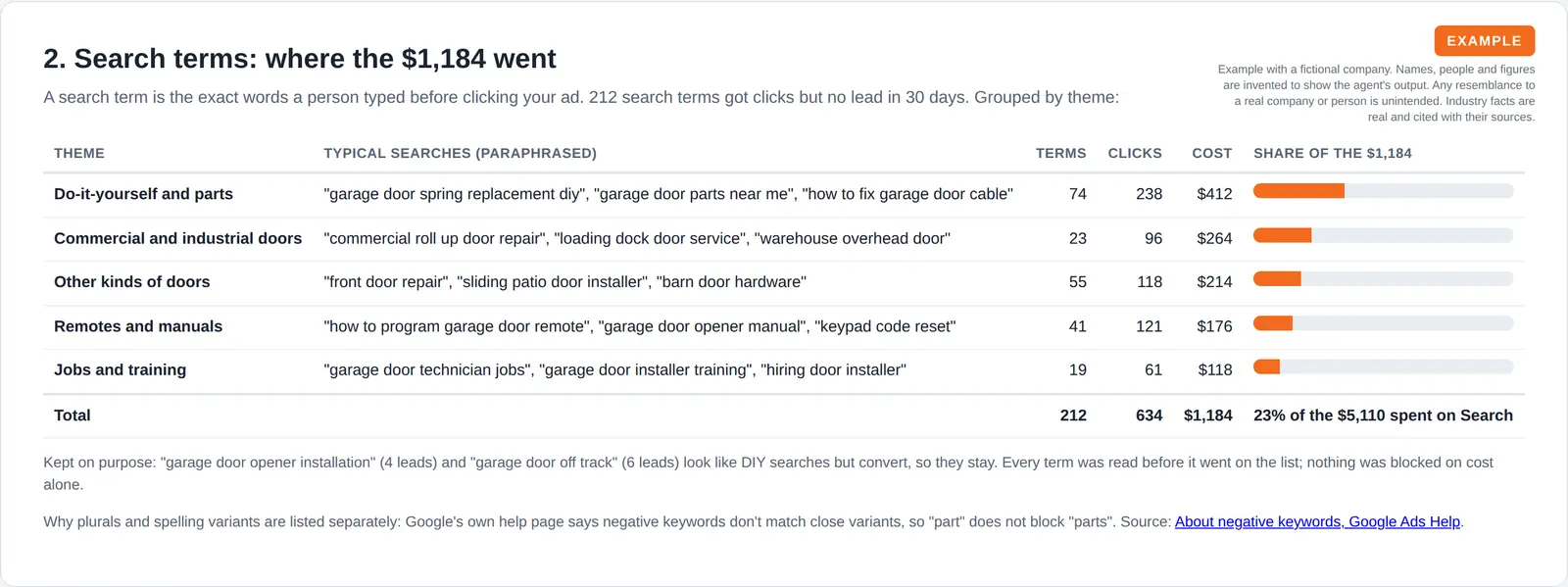
| Wasted spend | $1,184 on searches that brought no lead, out of $6,260 spent. |
|---|---|
| Zero-lead searches | 212 search terms, grouped into five themes: do-it-yourself and parts, commercial doors, other kinds of doors, remotes and manuals, and jobs and training. |
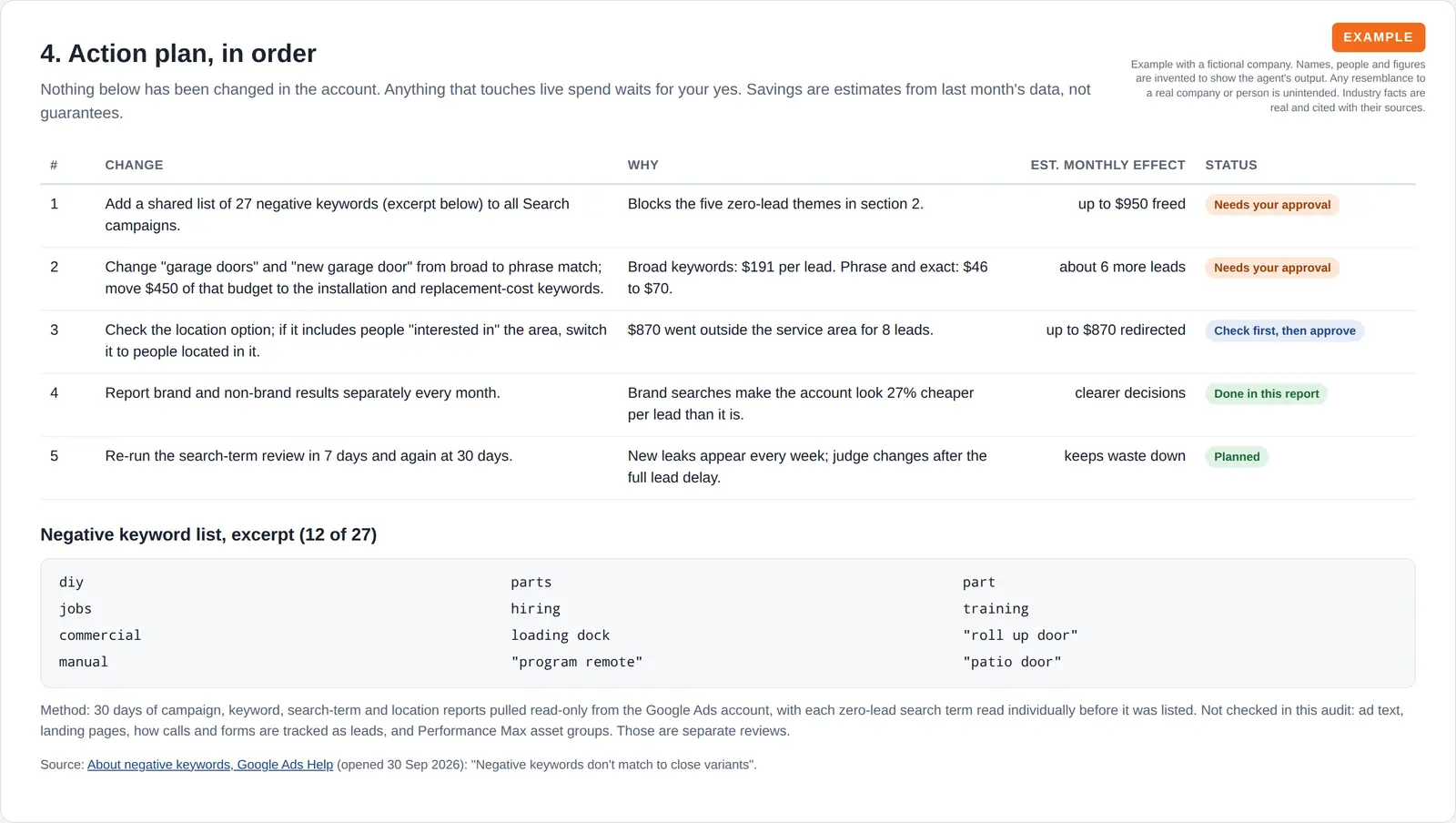
| The fix | 27 negative keywords to add, each one checked so it does not block a search that brings work. |
Built-in guardrails
The clean-up is view-only. Here is how it keeps you in control.
Better together
The agents and recipes that use this skill.
Agent. Runs the clean-up as part of its weekly review.

Agent. Reports the effect in your monthly spend report.
Recipe. The clean-up is one of its weekly steps.
Skill. Makes sure the leads it matches against are counted.
Common questions
No. The Google Ads Manager reads your account view-only and never changes a campaign, budget, bid or keyword.
You get the wasted searches grouped by theme and the negative keywords to add, each one checked so it does not block a search that brings work. A person on your team checks the list and adds them.
It matches your Google Ads search terms to the calls, forms and quotes your tracking records. A search that spent money with no call, form or quote behind it is counted as wasted.
That only works if your tracking is counting properly, which is why the weekly ads review runs the conversion tracking audit first.
Weekly is a good rhythm for most accounts, because search terms drift quickly and wasted spend adds up between monthly reviews.
It runs as part of the weekly ads review, or on request whenever you want a fresh look at where the money is going.
The Google Ads Manager can read Microsoft Advertising results view-only, so searches on Bing can be reviewed beside your Google searches.
The same rule applies: it reports the wasted searches and the negative keywords to add, and your team makes the changes.
We will run the search term clean-up on your own Google Ads account and walk you through the list.