

Chief of Staff
Agent. Preps your meetings and tracks every follow-up.
The meeting prep and follow-up is a skill in Ai1, the AI agent platform by MyZone AI. It scans your calendar, researches the outside people you are meeting and posts the prep in chat, daily or on request. The Chief of Staff adds the decisions, risks and an agenda before a big meeting, then turns each commitment into an owner, a next step and a date.
Prep you can read in minutes
The context, past commitments and the questions to ask, in one short page.
An agenda built on decisions
Meeting time goes to what needs a decision, and the rest is handled in writing.
No dropped follow-ups
Each commitment gets an owner, a next step, a date and a status.
At a glance
| Reads | Your calendar and the meetings, projects and open loops you want tracked |
|---|---|
| Researches | The outside people you are meeting |
| Before | Context, talking points and a timed agenda |
| After | Decisions captured, with an owner, next step and date for each follow-up |
| When | Daily on a schedule you set from chat, or whenever you ask |
| Run by | The Chief of Staff and the Phone Agent |
| Never | Sends messages or makes commitments without your approval |
A leader can go from one meeting to the next with no time to read up, and the agreements made in a meeting are easy to lose by the end of the week. A short prep page before, and a list of owners and dates after, means the hour is spent on decisions and the follow-through does not depend on anyone's memory.
How this differs from the Chief of Staff as a whole: the agent also writes your daily brief, builds decision packets and coordinates your other Ai1 agents; this skill is its work around each meeting.
How it works
Four steps. It drafts and tracks, and anything that goes out waits for you.
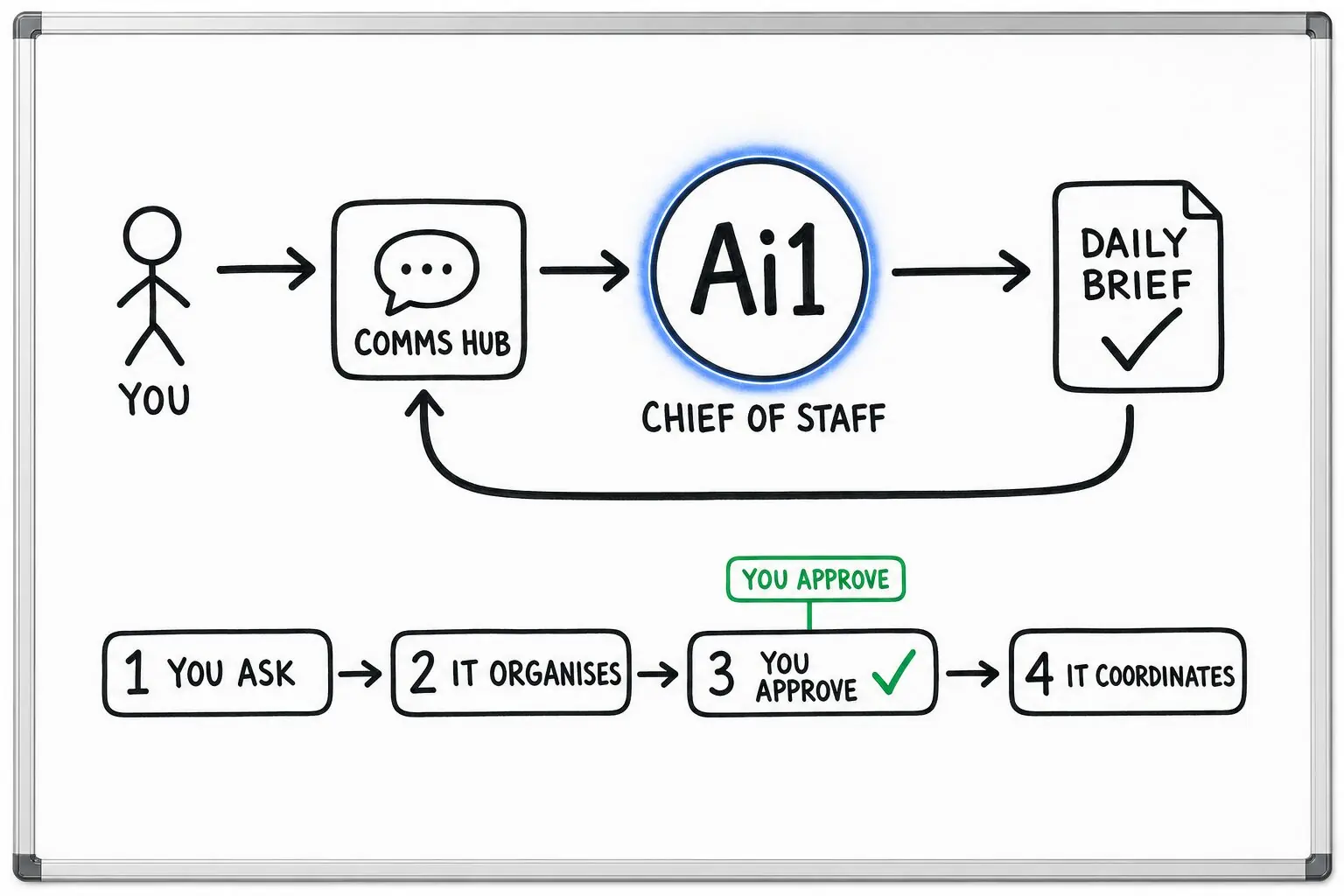
Finds the meetings coming up and who will be in them.
Looks up the outside attendees, pulls past commitments and drafts a decision-first agenda.
After the meeting, each commitment becomes an owner, a next step, a date and a status.
Messages, commitments and changes to records wait for your approval.
Example meeting prep
Example with a fictional business. Names and figures are invented to show the kind of output you get.
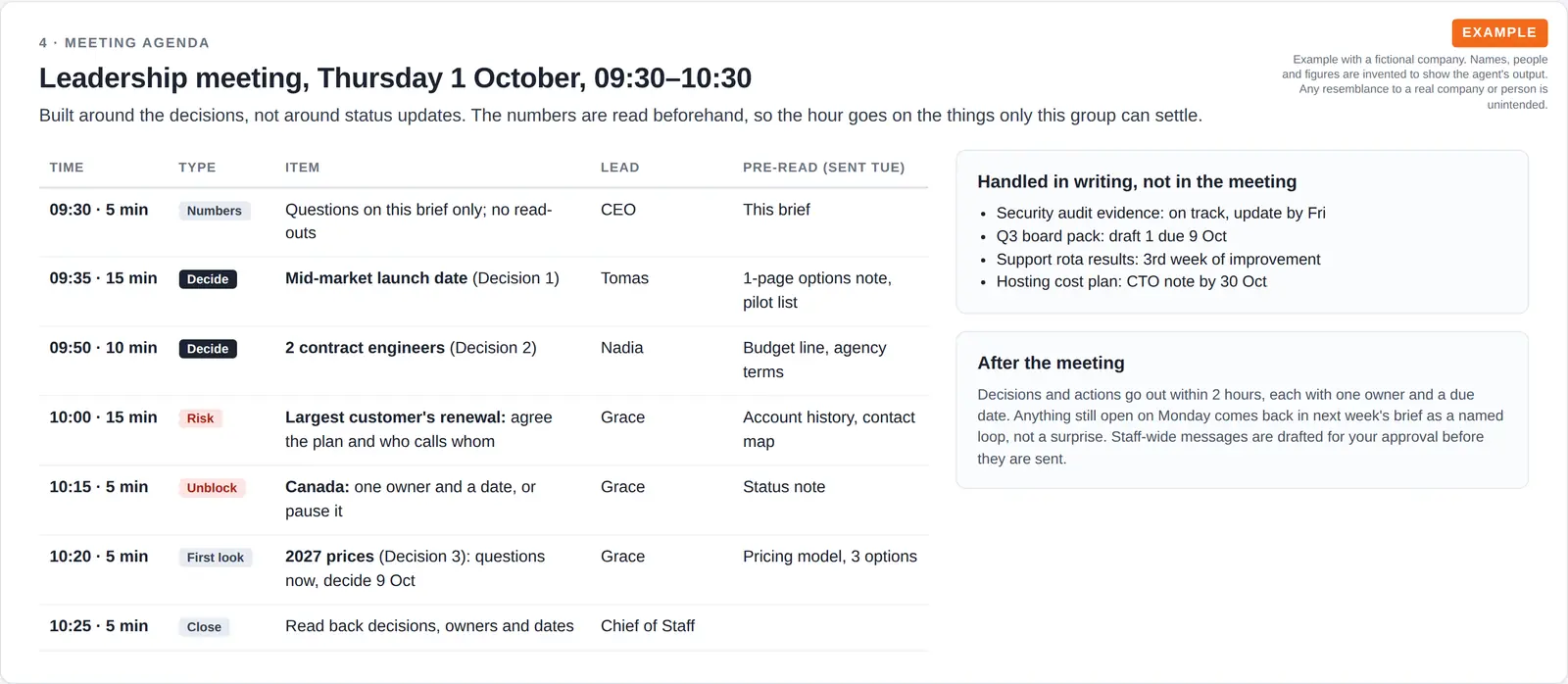
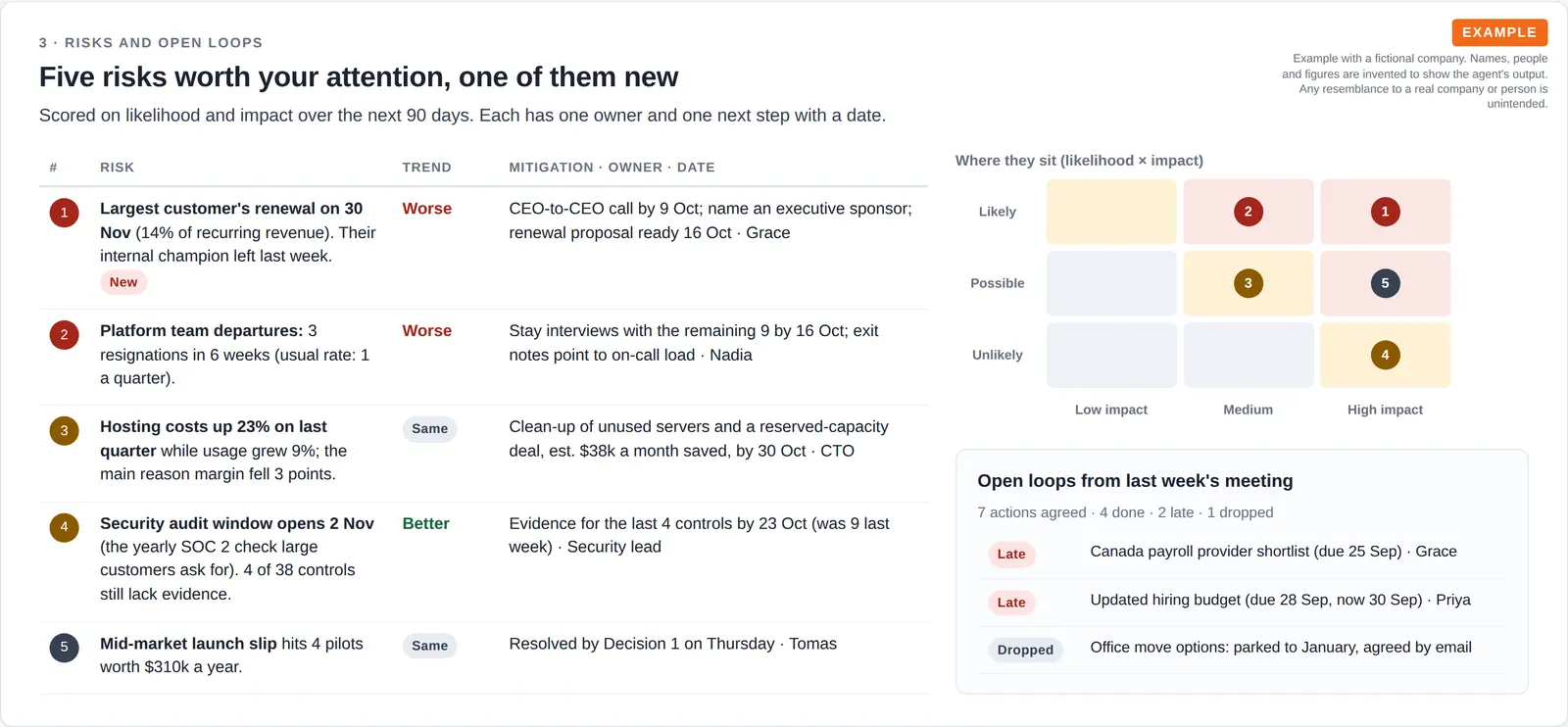
What it was asked: Give me one page before Thursday's leadership meeting: what I need to decide, where our quarterly priorities really stand, what could hurt us, and an agenda that uses the hour well.
| Decide this week | Three decisions for the CEO. The most urgent is whether to launch a new tier on 10 November without single sign-on, protecting $310k a year of signed pilot revenue. |
|---|---|
| Priorities | Three of six on track. Hiring is behind at 5 of 12 engineers, and one launch has been stuck three weeks on payroll setup. |
| Biggest risk | 14% of recurring revenue is up for renewal on 30 November after the customer's internal champion left, so the prep recommends a CEO-to-CEO call by 9 October. |
Built-in guardrails
How meeting prep and follow-up keeps commitments with you.
Better together
The agents that run this skill, and the agents, skills and recipes it works with.
Agent. Preps your meetings and tracks every follow-up.

Agent. Runs your calendar by phone, text, app or chat.
Skill. Turns a recorded call into a summary with action items.
Recipe. Takes the follow-ups from a meeting into your task list.
Common questions
Access to your calendar, plus your top goals and the meetings, projects or open loops you want tracked. If your calendar is not connected, it asks for it first instead of guessing.
Yes. You set the daily briefing up and schedule it from chat, and it also runs whenever you ask for it.
No. It drafts them and tracks each follow-up. Anything that goes outside the business or commits you to something waits for your approval.
Tell us about a meeting coming up and we will show you the prep and the follow-up list.