MyZone AI
Ai1 Agents
Platform Overview
Your AI team on your own private server
Agents
Meet every agent, by department
Apps
Software your agents work inside
Skills
What each agent can do
Recipes
Agents and skills working together
Jobs
Weekly work you can hand to your AI team
Meet the teamAll agents →
Products
Chatbots
AI assistants for your business
AI Readiness
Assess your AI maturity
Services
Coaching
1:1 AI implementation coaching
Marketing
AI-automated campaigns
Analytics
AI lead scoring & attribution
Web Development
AI-enhanced websites
Workshops
Learn
AI Learning Center
Guides, explainers and tools
Bookings
Book custom workshop
Prompting You
Interactive prompt builder
Pricing Contact
Log in Client log in opens the client portal Book a call
Ai1 Agents (700+ agents and skills)›
Platform OverviewAgentsAppsSkillsRecipesJobs
Services›
ChatbotsAI ReadinessCoachingMarketingAnalyticsWeb Development
Workshops›
Learn›
AI Learning CenterAgentic Development Best PracticesBookingsPrompting You
Client log in Opens the client portal in a new tabBook a callContactSee plans & pricing →
  1. Home
  2. Skills
  3. Contract review
Agent skill

Contract review: know what to push back on before you sign

Reads a contract clause by clause against your standard positions, scores the risk and ranks the fixes.

The contract review is a skill in Ai1, the AI agent platform by MyZone AI. The Legal Agent runs it on any contract you are sent: it red-lines the wording against your playbook, or a neutral default if you have none, flags gaps and risks, scores each one low, medium or high and ranks the fixes. Your lawyer reviews the result. It is not legal advice.

Book a call → See an example review ↓
  • Part of Ai1
  • Your lawyer keeps the final say

Who runs this skill

  • Legal AgentReviews every contract you receive before you sign.

It flags risks for your lawyer. It never signs anything.

  • Review starts where the risk is

    The few clauses that matter most come first, so your lawyer does not start from page one.

  • A clear ask for each issue

    Each risky clause comes with suggested wording to push for.

  • Gaps caught before signing

    Missing protections are flagged alongside the risky ones.

At a glance

The contract review in short

The contract review at a glance
ReadsAny contract you have been sent, clause by clause
Compares withYour playbook and standard positions, or a neutral default
ScoresEach issue low, medium or high, with the fixes ranked
You getSuggested redlines and a ranked list of what to push back on
Run byThe Legal Agent
NeverSigns, sends or finalises a document

Why review a contract before you sign

A supplier agreement can cap what they owe you, claim rights to your data or make leaving expensive, and the clause that matters is rarely on page one. Reading every page from scratch takes your lawyer time you pay for. The review does the first pass, so that time goes on the clauses that carry real exposure.

How this differs from the Legal Agent as a whole: the agent also drafts agreements from your templates; this skill is the review it runs on contracts you receive.

How it works

From a contract you were sent to a ranked list

Four steps. Nothing is signed or sent, and your lawyer reviews the result.
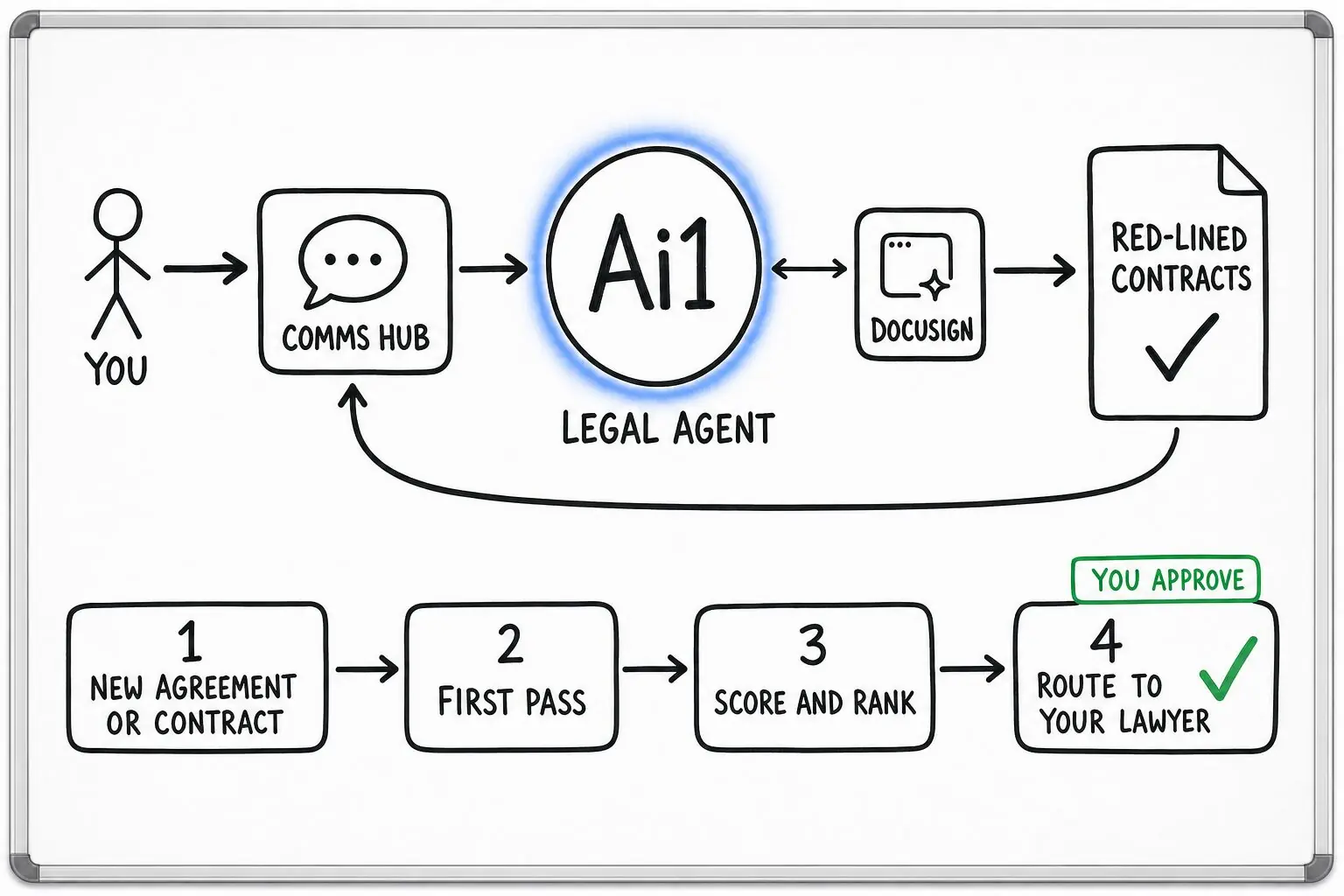
How the Legal Agent works: you ask through the Comms Hub and Ai1 runs the steps: new agreement or contract, first pass, score and rank and route to your lawyer. It works with DocuSign. You approve at: route to your lawyer. It returns a red-lined contracts.
Tap the diagram to enlarge it

Step 1: You share the contract

Send the agreement you have been asked to sign, with anything you already know about the deal.

Step 2: It reads every clause

Each clause is compared with your playbook, or a neutral default if you have none.

Step 3: It scores and ranks

Gaps and risks are scored, and the fixes are ranked so the biggest exposure comes first.

You approve

Step 4: You and your lawyer decide

The red-lined draft and the ranked list go to your lawyer, marked as needing review. You decide what to sign.

Example contract review

Example: a supplier's cloud software agreement

Example with a fictional company. Names and figures are invented to show the kind of output you get. Not legal advice: MyZone is not a law firm.

What it was asked: Red-line the supplier's cloud software agreement before we sign a three-year deal, and tell us what to push back on.

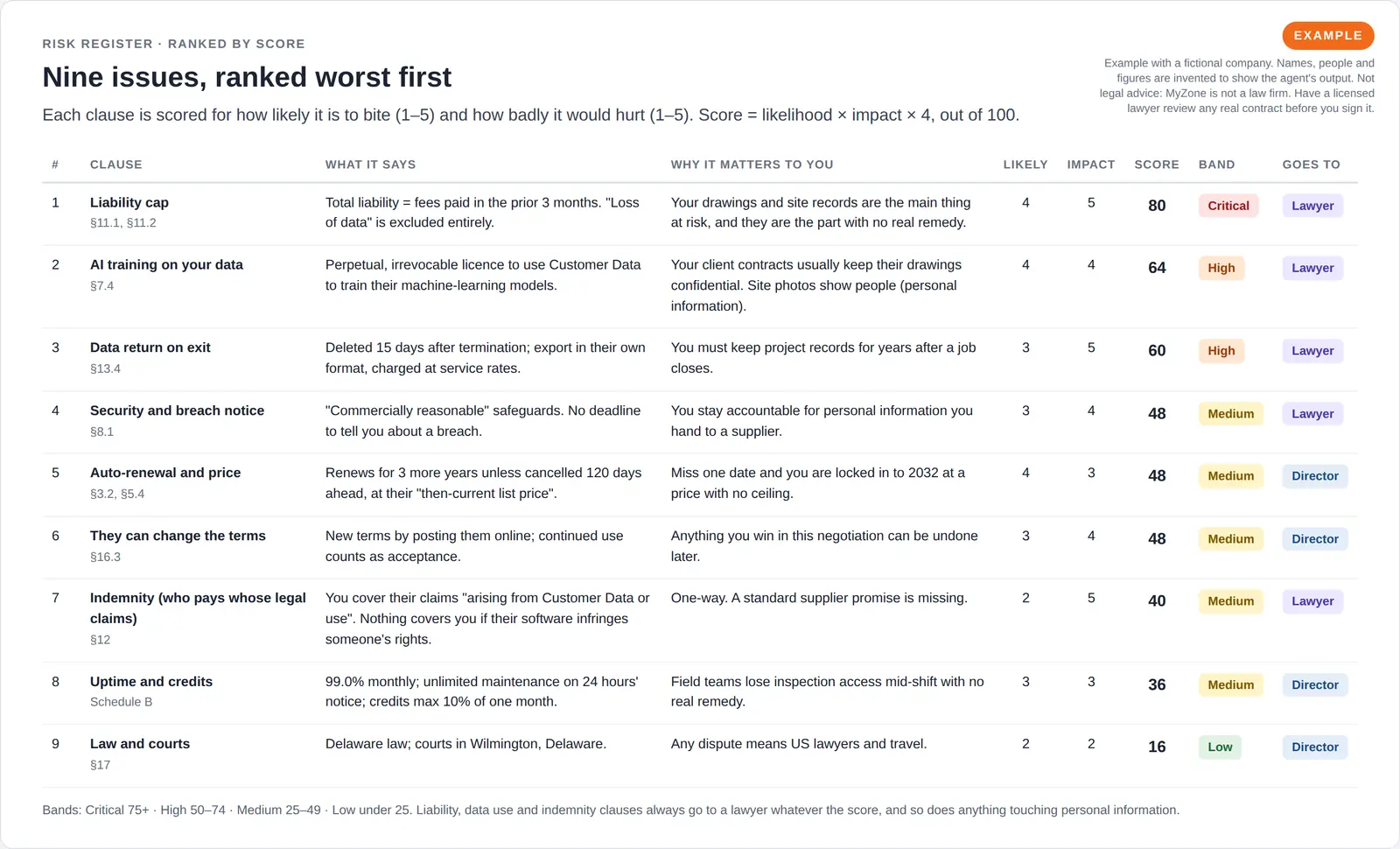
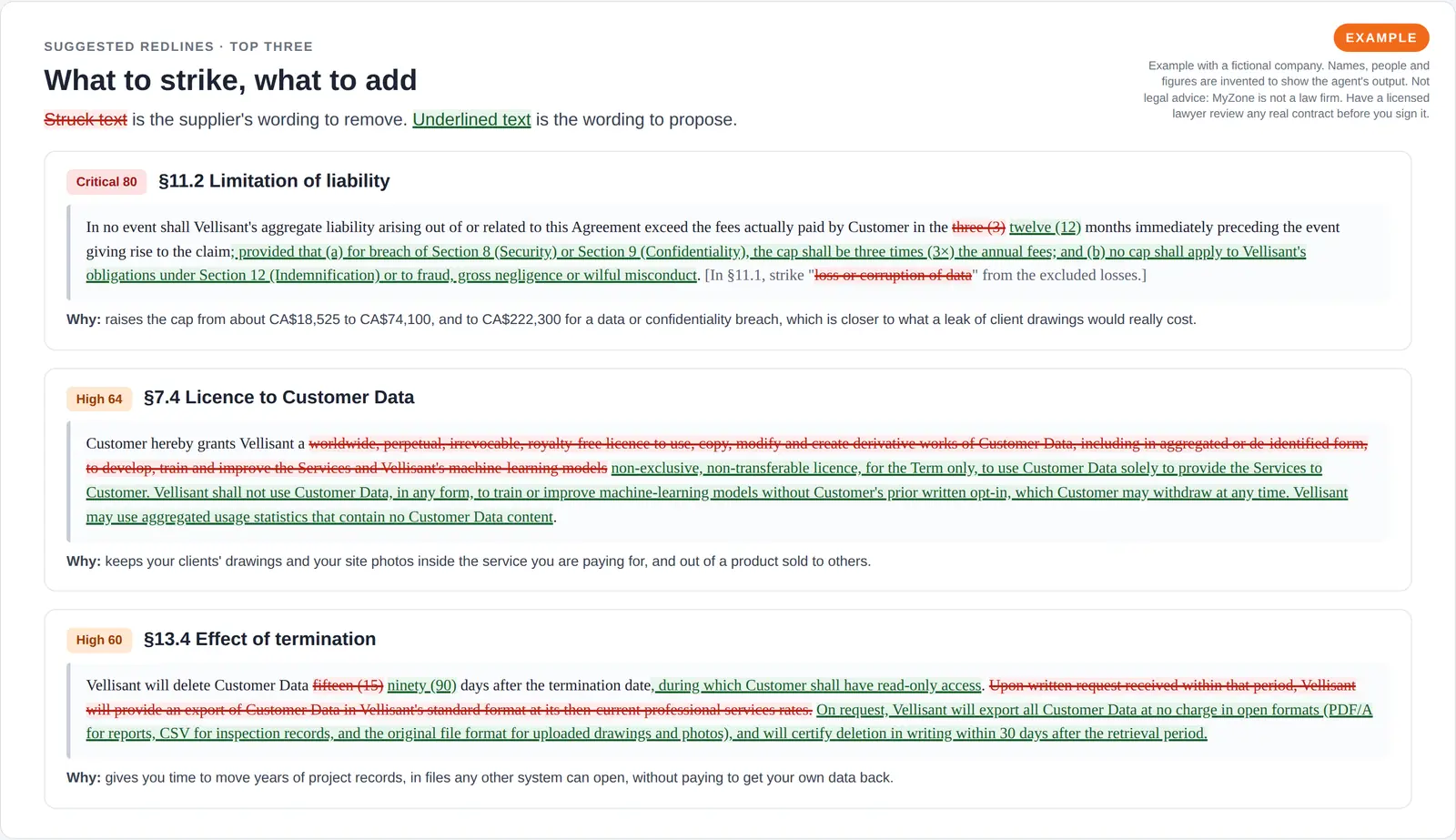
What the review found, a fictional three-year software deal
Liability capFlagged. Capped at three months of fees, about CA$18,525, even for a data leak. Ask for 12 months, and three times annual fees for data breaches.
Use of your dataFlagged. The supplier may train its AI on your clients' drawings forever. Limit it to running the service, with training only if you opt in.
LeavingFlagged. Records are deleted 15 days after the end and exports cost extra. Ask for 90 days and free exports in open formats.
Table of nine contract issues ranked from worst to least, each with the clause, what it says, why it matters, likelihood and impact scores, a coloured risk band and whether it goes to a lawyer or the director.
Risk registerNine issues ranked by score, with who should handle each.
Three contract clauses shown as tracked changes, with the supplier's wording struck through in red and proposed replacement wording underlined in green, each with a one-line reason.
Suggested redlinesThe supplier's wording struck out and the proposed wording added.

Built-in guardrails

It flags, your lawyer decides

How the contract review keeps the decision with you and your lawyer.

  • Every result is marked as needing a lawyer's review. It never signs or finalises a document.
  • It works from your standard positions and flags what it cannot tell, instead of guessing.
  • It is not legal advice, and MyZone is not a law firm. Your lawyer keeps the final say.

Better together

Works well with

The agent that runs this review, and the agents and skills it works with.

  • Legal Agent

    Agent. Runs the review and drafts agreements from your templates.

  • Chief of Staff

    Agent. Puts contract decisions and signing deadlines on your leadership agenda.

  • Procedure write-up

    Skill. Turns the agreed contract steps into a procedure your team follows.

Common questions

Frequently asked questions about the contract review

Is this legal advice?

No. The contract review is a first pass that flags risks for your lawyer to review. MyZone is not a law firm, and a licensed lawyer should review any real contract before you sign it.

What does it compare the contract with?

Your playbook and standard positions, if you have them. If you do not, it uses a neutral default, and the review says so.

Will it sign or send anything?

No. It never signs, sends or finalises a document. Negotiating with the other party stays with you or your lawyer, and the review gives you the plan.

Review your next contract with us

Bring an agreement you have been sent and we will show you the review, ready for your lawyer.

Book a call → See plans & pricing
  • Your own private serverEvery Ai1 plan runs on a private server that belongs to your business alone.
  • Your data stays yoursStored on your server, not used to train AI models, and you can export everything you build at any time.
  • Choose your AI modelBring your own AI provider account and pay it directly, with no markup from us.
  • No lock-inMonthly plans run month to month with no long-term commitment, and everything you build can be exported.
MyZone AI

© 2026 MyZone AI [v5.78]. All rights reserved. AI-powered products, services, and training for businesses ready to scale. Built entirely by AI agents using the MyZone Ai1 platform.

Products

  • Ai1 Platform
  • See it working
  • AI Agents
  • Apps
  • Skills
  • Recipes
  • Jobs
  • Pricing
  • Chatbots
  • AI Readiness

Services

  • Marketing
  • Analytics
  • Coaching
  • Web Development
  • Workshops
  • Bookings

Learn

  • AI Learning Center
  • Agentic Development Best Practices
  • AI Business Strategy
  • AI Marketing Guide
  • AI Automation Guide
  • AI Agents for Business
  • AI Operations Guide
  • AI Security Guide

Company

  • About MyZone
  • Blog
  • Contact
  • Security
  • Privacy Policy
  • Terms of Service