

Sales Call Coach
Agent. Scores each recorded call, writes the report and coaches the rep.
Call Report is an app inside Ai1, the AI agent platform by MyZone AI. The Sales Call Coach agent writes the reports, and the app keeps a coaching history for every rep.
Every call reviewed
Each recorded call gets a report, not just the few someone has time to listen to.
Coaching that builds
Advice draws on the rep's earlier calls, so it moves forward instead of repeating.
Where to step in
Flags point managers to the calls that need them, without listening to every recording.
Talk to the agent
You do not have to open Call Report to use it. Reps and managers ask the Sales Call Coach in Slack or chat, and it answers from the app.
Agent. Scores each recorded call, writes the report and coaches the rep.

Agent. Routes call questions to the coach and uses its findings to improve the team.
Ask in plain words: "Here is yesterday's demo call. How did I do?" The agent reads the app and answers.
At a glance
| Calls come in | Posted to your lead channels in Slack, or uploaded any time |
|---|---|
| Scored against | Your own playbook, the same way for every call |
| The report | Phone-friendly, branded and sent only to people allowed to see it |
| New reps | Their first three call reports stay private to them |
| What it never does | Contact your customers, or invent a score |
Before you start
Listening back takes hours, so most calls are never reviewed. Call Report covers every recorded call, scores each one the same way and keeps the full transcript in your drive, with a link from the report.
Example call report
Example with a fictional business. Names and figures are invented to show the kind of output you get.
What it was asked: Here is yesterday's recorded demo call: write the call report, coach the rep and tell the sales manager if anything needs her attention.
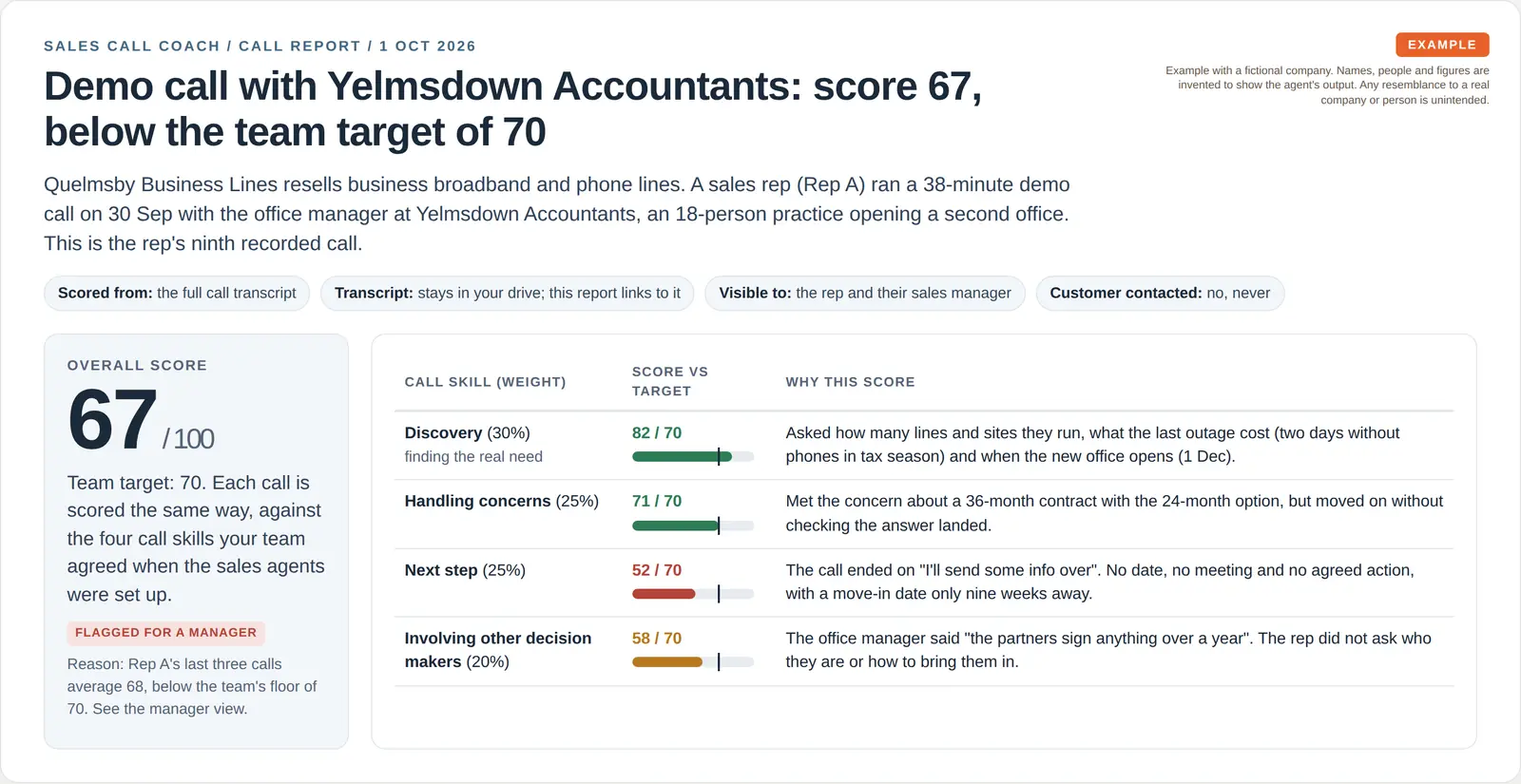
| Score | 67 out of 100, against a target of 70. Discovery was strong at 82, but the call ended with no agreed next step and no date. |
|---|---|
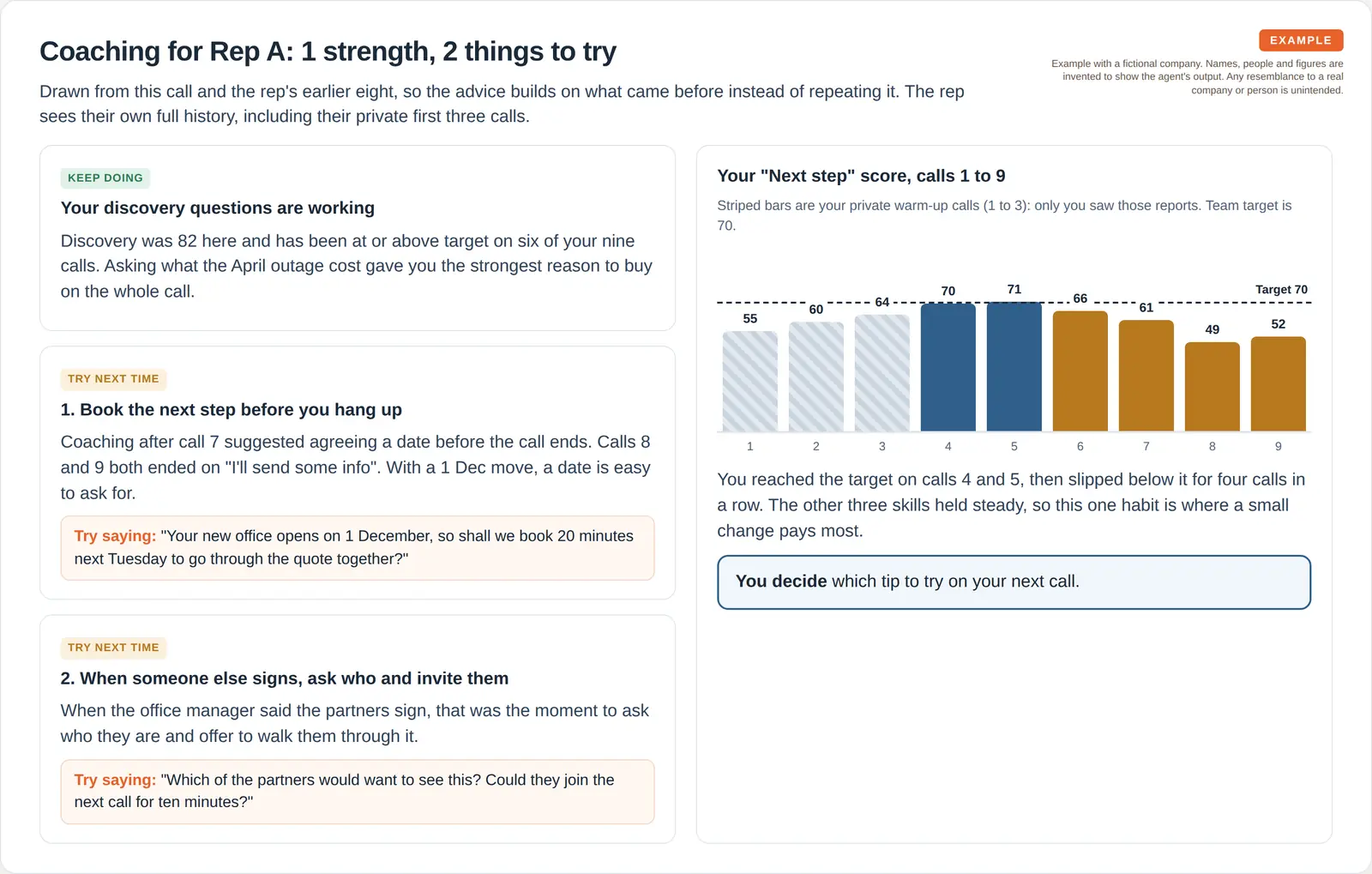
| Coaching | Two things to try. The rep's next step score was below target four calls in a row, so the coaching gives him words to use on the next call. |
| Manager | Flagged. His last three calls average 68, below the team floor of 70, so his sales manager decides what happens next. |
How it works
Calls come in from Slack or an upload. The report and coaching follow while the call is fresh.
A recorded call is posted to a lead channel or uploaded.
The call is scored against your playbook and checked for anything a manager should see.
A branded report goes only to the people allowed to see it.
The rep gets specific coaching drawn from this call and earlier ones.
Built-in guardrails
Call Report runs inside Ai1, under the same rules as every agent.
Better together
The agents and apps that work with Call Report.
App. Answers the product and pricing questions that come up in calls.

Agent. Shows call reports alongside the pipeline in one view.

Agent. Drafts the follow-up email after a call, for a person to send.
Common questions
The rep sees their own, and managers see the team. Each rep's first three calls stay private to that rep while they settle in.
When in doubt, it keeps a report private.
Your own playbook: the same call skills and weights for every call, so scores are fair to compare.
If a score cannot be worked out, the report describes the call and says scoring is unavailable.
Yes, through Live Coach. It runs beside your call with talk-time cues, answers to what the customer just asked and the next question to ask. Call Report then scores the recorded call.
No. It reports and coaches only. Follow-up drafts come from Sales Reply, and a person sends them.
Yes. Call Report is part of Ai1 and ready to use.
Book a call and we will show you a report and coaching built from your own recorded calls.